Creating a monospace font
Thought 1
Once I figure out how to do this flowchart thing, I want to document how it works. If I dont, I'll forget later.
Planning ahead
For documenting code, having a monospace font is better. This means every letter is the same size, and code blocks wind up with nice edges. Indentation is important for keeping things organized.
My problem? I don't have a monospace font yet.
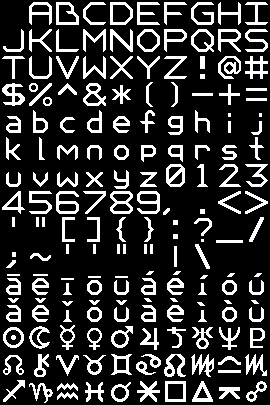
Made this picture in Aseprite and uploaded it to Yal's Pixel Font Converter
Test 1:
Ok, lets see how well it displays some css. The following window uses this page's css as test content:
Side Scroll Window 1
_Ox
<style> .scrollable-window { width: 100%; height: auto; overflow-x: auto; border: 4px solid white; box-sizing: border-box; padding: 10px; margin-bottom: 60px; } .font-picture { width: 600px; display: block; margin: 10px auto 100px; } /* setting colors */ h1, h2, h3, h4, h5, li, p { color: var(--purple_heart); } .div-border { border: solid 4px var(--purple_heart); box-sizing: border-box; margin-bottom: 100px; } @font-face { font-family: "Monospace Version 9-5"; src: url('/fonts/older-fonts/Dark\ Potion\ 27\ Monospace\ Regular-2026-09-05.ttf'); } @font-face { font-family: "Monospace Version 9-6"; src: url('/fonts/Dark-Potion-27-Monospace-Regular-2026-09-06.ttf'); } .monospace-version-9-5 { font-family: "Monospace Version 9-5"; color: white; } .monospace-version-9-6 { font-family: "Monospace Version 9-6"; color: white; } .scroll-window-header { background-color: white; padding: 5px; } .purple-window-header { background-color: var(--purple_heart); padding: 5px; } .scroll-window-header h3 { color: black; margin: 0; } @media (max-width: 600px) { .font-picture { width: 300px; } } </style>
Result:
It's too spaced out. Lower case letters have too much horizontal space between them now. Instead of each letter taking up a square of space, I'll try a version where each letter takes up a tall rectangle instead.
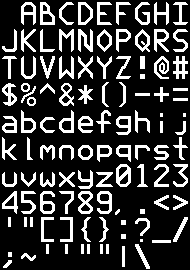
New settings for next test:
- Tile height: 27
- Tile width: 19
- Letter width: 15
- Removed characters that are uneeded in code:
- Chinese tone vowels
- Astrological
Side Scroll Window 2
_Ox
<style> .scrollable-window { width: 100%; height: auto; overflow-x: auto; border: 4px solid white; box-sizing: border-box; padding: 10px; margin-bottom: 60px; } .font-picture { width: 600px; display: block; margin: 10px auto 100px; } /* setting colors */ h1, h2, h3, h4, h5, li, p { color: var(--purple_heart); } .div-border { border: solid 4px var(--purple_heart); box-sizing: border-box; margin-bottom: 100px; } @font-face { font-family: "Monospace Version 9-5"; src: url('/fonts/older-fonts/Dark\ Potion\ 27\ Monospace\ Regular-2026-09-05.ttf'); } @font-face { font-family: "Monospace Version 9-6"; src: url('/fonts/Dark-Potion-27-Monospace-Regular-2026-09-06.ttf'); } .monospace-version-9-5 { font-family: "Monospace Version 9-5"; color: white; } .monospace-version-9-6 { font-family: "Monospace Version 9-6"; color: white; } .scroll-window-header { background-color: white; padding: 5px; } .purple-window-header { background-color: var(--purple_heart); padding: 5px; } .scroll-window-header h3 { color: black; margin: 0; } @media (max-width: 600px) { .font-picture { width: 300px; } } </style>
HEY YEAH! I feel pretty good about that. Now I can elaborate more on how lines are drawn.
Line Connection (Next post) Refining Monospace (Next related) Back to Flowchart Back to home